
Discord & gaming
Route PocketMic through VB-CABLE into Discord, TeamSpeak, or in-game voice chat. Your phone's mic is often better than a headset boom.
Open source · MIT licensed
PocketMic turns any Android phone into an encrypted, high-quality microphone for your Windows PC — over your private LAN, with zero cloud and zero account.




One encrypted packet— 1000 bytes · 10 ms of audio · 100× per second
Built for
PocketMic turns a phone you already own into a wireless microphone for any Windows app that needs one.
Route PocketMic through VB-CABLE into Discord, TeamSpeak, or in-game voice chat. Your phone's mic is often better than a headset boom.
Use your phone as a wireless lapel mic for OBS, Streamlabs, or any broadcasting software. Move freely while staying connected.
Present from anywhere in the room. PocketMic routes into Teams, Zoom, or Google Meet as a system microphone via VB-CABLE.
How it works
Both devices stay on your private network. Scan a QR code or type an IP — everything after that is encrypted.
Run PocketMicReceiver.exe. It shows your IP address and generates a pairing key.
Open PocketMic on Android and scan the QR code. IP, port, and encryption key fill in automatically.
Your phone captures audio at 48 kHz, encrypts every 10 ms frame with AES-256-GCM, and streams it to your PC over UDP.
To route into Discord, OBS, or Teams, install VB-CABLE, select CABLE Input as PocketMic Receiver output, then select CABLE Output as the microphone in the target app. A built-in virtual audio device remains on the roadmap.
Features
Every packet authenticated. Key derived from a pairing phrase you choose.
Point your phone camera at the PC screen. No IP addresses to type.
Voice (device-processed), Clean (raw), or Custom (PC-side DSP chain).
Route to speakers, headphones, VB-CABLE, or VoiceMeeter.
Input gain from 0.5× to 3× with a live level meter.
Prebuffering, loss concealment, rollover-safe sequencing, and auto-reconnect.
Stays alive in the background with a notification. Wi-Fi lock keeps packets flowing.
Packet counters, jitter stats, Wi-Fi band/RSSI, and exportable session reports.
Voice processing
PocketMic's Voice mode uses the phone's own voice-communication processing — the vendor-tuned noise suppression, gain control, and echo handling. No stacking.
Uses VOICE_COMMUNICATION — the Android source that phone vendors tune for calls. Exactly one processing layer: the device's own. No software noise suppression, gain control, or echo cancellation stacked on top. This is what made the old double-DSP path sound hissy and pumped — we removed it.
Best for: Discord, Teams, calls, general voice chat
Requests the rawest input the phone offers — UNPROCESSED where supported, falling back to VOICE_RECOGNITION and then MIC. No phone-side processing. What you send is what the mic picks up.
Best for: recording, podcasting, when you want full control
Clean capture from the phone, shaped by the receiver's DSP chain on the PC: high-pass filter, noise gate, compressor, presence EQ, and limiter. Sliders on the phone control the PC-side processing live — changes apply instantly while streaming.
Best for: streaming, broadcasting, when you want PC-side control
Screenshots
From the v0.1.5 artifacts on a OnePlus 9 Pro and Windows 11 PC. No mockups.
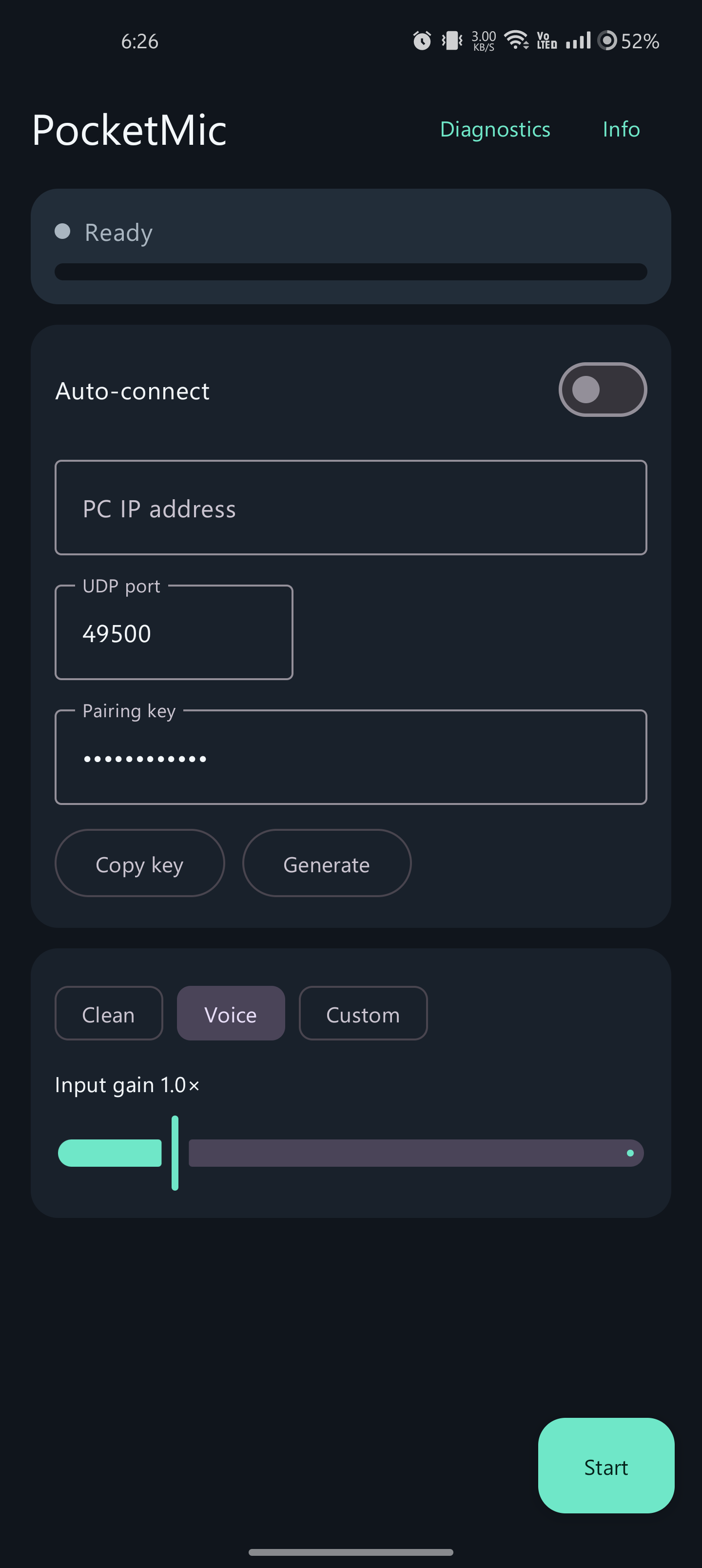
QR pairing, capture modes (Voice / Clean / Custom), adjustable gain, live level meter. Runs as a foreground service with Wi-Fi lock.
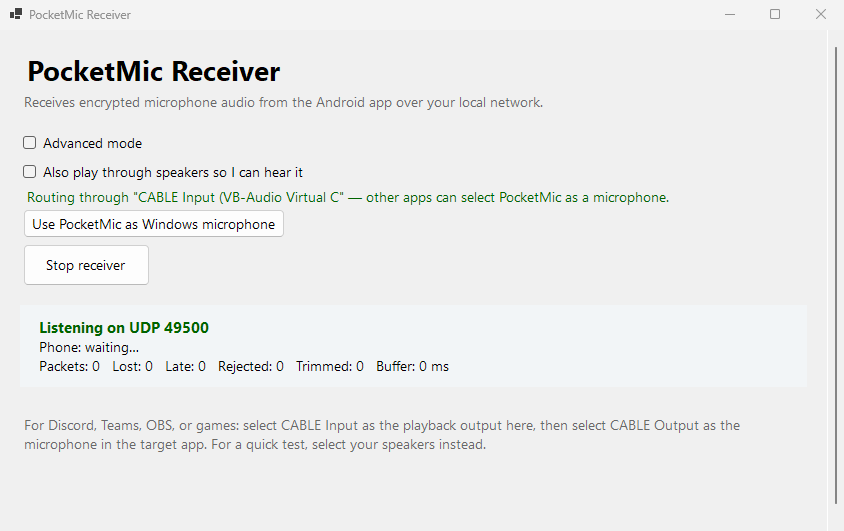
Auto-discovers VB-CABLE, one-click default mic switching, voice processing chain, session diagnostics with export.
Compare
Each approach has tradeoffs. PocketMic's niche is encrypted, phone-as-microphone on a private LAN with no cloud dependency.
| Feature | PocketMic LAN | Bluetooth mic | Discord / Krisp | USB mic |
|---|---|---|---|---|
| Phone as wireless mic | Yes | Yes | No | No |
| Encrypted on the wire | AES-256-GCM | Depends | TLS | N/A |
| LAN only — no cloud | Yes | Yes | No | Yes |
| No account required | Yes | Yes | No | Yes |
| Works with any app | Via VB-CABLE | OS default only | Discord only | Yes |
| Sample rate | 48 kHz | 8–16 kHz | 48 kHz | 48+ kHz |
| Wireless | Yes | Yes | N/A | No |
| Open source | MIT | N/A | No | N/A |
Performance
These baseline PCM figures were recorded on a OnePlus 9 Pro and Windows 11 PC over 5 GHz Wi-Fi. The v0.1.5 adaptive Opus path still needs its end-to-end hardware and network checks.
Adjustable 40–300 ms on the receiver.
Buffered latency trimmed above this mark.
Repeated-decay fill for up to 20 lost packets.
48 kHz mono PCM16 — 1000 bytes per datagram.
The v0.1.5 receiver adds adaptive Opus buffering; see the release notes for implementation details and the project evidence file for remaining live-device checks.
Security
Authenticated encryption on every datagram — and an honest boundary about what that means.
SHA-256(UTF-8(pairing key))FAQ
Yes. Install VB-CABLE, select CABLE Input in PocketMic Receiver, then select CABLE Output as the microphone in your target app. One setup, works everywhere.
No. PocketMic works entirely over your local Wi-Fi or Ethernet. Both devices must be on the same private network. No data ever leaves your LAN.
PocketMic streams at 48 kHz mono PCM16 — the same sample rate as professional audio. Your phone's microphone hardware is usually better than a cheap headset boom. Voice mode uses the device's own voice-communication processing.
Measured at 100–250 ms glass-to-speaker on Wi-Fi, depending on your network. Fine for voice chat and streaming. Not suitable for real-time music monitoring. The prebuffer is adjustable (40–300 ms) to trade latency for stability.
Every single packet is encrypted with AES-256-GCM. The key is derived from a pairing phrase via SHA-256. The nonce uses a random session ID plus a per-packet sequence number. The pairing key is stored encrypted at rest on Android via the Keystore.
Bluetooth audio is typically 8–16 kHz (phone quality). PocketMic streams at 48 kHz (CD quality). Bluetooth also introduces its own latency and compression artifacts. PocketMic gives you professional audio quality over your existing Wi-Fi.
PocketMic holds a partial wake lock and a Wi-Fi performance lock while streaming. Expect moderate battery use — similar to a voice call. The app stops all background activity the moment you tap Stop.
Not yet. The Windows receiver is the only one available. The protocol is documented and simple — a macOS or Linux receiver is possible but hasn't been built.
Build from source
The package ships source plus tooling. The current GitHub release includes a debug-signed Android APK and a pre-built Windows receiver; neither is a store installer.
# from the package root (PowerShell)
Set-ExecutionPolicy -Scope Process Bypass
.\scripts\build-android.ps1
.\scripts\publish-windows.ps1adb install -r .\release\app-debug.apk.\scripts\allow-firewall.ps1Allow UDP port 49500 on Private networks only.
Honest limits
None of these are hidden before you build.
Get started
Free, open source, MIT licensed. Build from source or download the pre-built receiver.